
Description
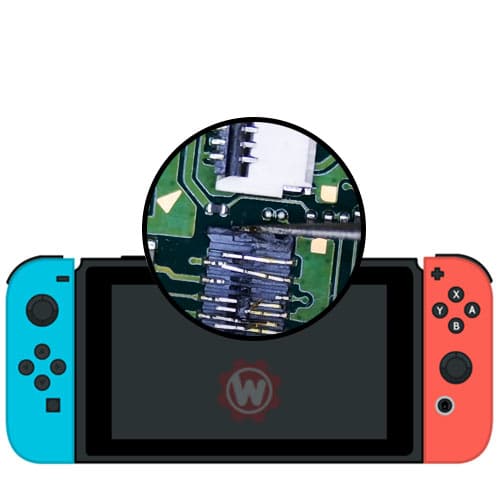
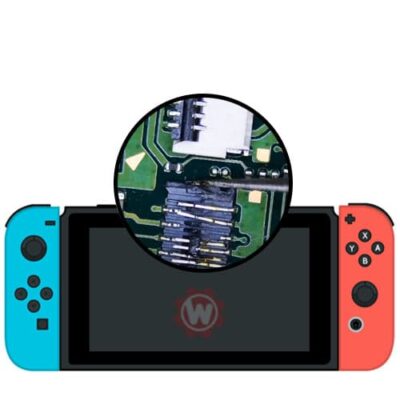
The FPC connectors are the small ribbon-cable sockets soldered directly to your Switch's motherboard — the ones your screen, SD card reader, Joy-Con rails, and fan plug into. When one tears off, loses pins, or gets damaged during a screen or battery swap, that component simply stops working even though everything else is fine. We replace the connector itself with board-level micro-soldering, test the repaired function, and send it back with a 180-day warranty. Every Switch model, every connector type.
Compatible with
What's included
How it works
Tell us what's not working
Order the service and describe the symptom — black screen, SD card not detected, Joy-Con won't connect. Not sure which connector? Contact us and we'll help identify it.
Ship your Switch to us
We recommend UPS or USPS with tracking — Pirate Ship is the cheapest way to buy either label. Console only — no SD card or accessories needed. Follow our shipping instructions for packaging tips.
We diagnose & replace
We confirm the faulty connector, remove it cleanly, solder the replacement, and test the repaired function under load — plus a full internal dust clean.
Receive it back, working
We ship it back free, usually within 24–48 hours of arrival. Your 180-day warranty starts the day it's delivered.
Symptoms of a Failed FPC Connector
FPC connector damage almost never looks like connector damage — it looks like a dead component. If one of these matches your Switch, a torn or damaged ribbon socket is a likely cause:
Black screen, but the console powers on. The backlight may glow faintly, sound still works, and it charges normally — but no image. This is the LCD ribbon connector, and it's the single most common FPC failure we see, especially right after a screen or battery replacement.
SD card no longer detected. The console reports no card inserted no matter which card you try. The SD reader is mounted on its own flex cable, and its connector is easily damaged by forcing a card in at an angle.
A Joy-Con won't attach or register. One rail stops detecting controllers while the other works fine. The rail flex connector has usually lost a pin or lifted from its pads.
Fan stopped spinning, or the console overheats and shuts down. The fan and left trigger share a connector on many boards — if both failed at once, that's your answer.
Something broke during a DIY repair. Screen and battery replacements require unplugging several ribbon cables, and the sockets are fragile. Tearing one off the board is the most common way a straightforward parts swap turns into a board-level repair. If that's what happened, you're in the right place — we fix these every week and we won't lecture you about it.
Why FPC Connectors Need Board-Level Repair
An FPC (flexible printed circuit) connector is a socket soldered directly to the motherboard, often with 40 to 50 pins spaced a fraction of a millimeter apart. Replacing one is not a parts swap — it means removing the damaged socket without lifting the pads underneath, cleaning the footprint, aligning the new connector across every pin, and reflowing it without bridging.
Most repair shops don't do this. They'll quote you a full motherboard replacement or tell you the console isn't worth fixing, because the alternative requires a microscope, hot air, and the experience to know when a pad has been damaged and needs a jumper. That's the work we've been doing since 2010.
It's also why the diagnosis matters: a black screen can be a torn LCD connector, a bad screen, or a power fault, and the fix is completely different in each case. If you're not sure what you're looking at, ship it in and we'll tell you what we find before doing the work.
Common questions
FPC stands for flexible printed circuit. It's the small socket soldered to the motherboard that a ribbon cable plugs into. Your Switch has several — for the LCD screen, SD card reader, Joy-Con rails, fan, and triggers. When one is damaged, that specific component stops working while the rest of the console is fine.
Very likely. The LCD ribbon connector sits right next to the battery and is easy to tear or damage while unplugging cables. If the console still powers on, charges, and plays sound but shows no image, a damaged LCD FPC connector is the most common cause.
All of them — LCD/screen, SD card reader, Joy-Con rail, fan, trigger, and any other ribbon socket on the board. We stock multiple connector types for V1, V2, Lite, and OLED consoles. If you're unsure which one you need, contact us and describe the symptom.
Yes. This service covers every current Nintendo Switch model — V1, V2, Lite, and OLED. The connector types differ between models, and we source the correct part for yours.
Occasionally a connector with a bent pin can be reworked, but in most cases replacement is the reliable fix — a socket that has torn from its pads will not hold a ribbon securely again. If the pads underneath were damaged, we can usually rebuild them with jumper wires.
Repairs are usually completed within 24–48 hours of arrival, then shipped back free. Local customers can call to book a same-day appointment.
We diagnose before we repair. If the fault turns out to be something else — a failed screen, a power issue, or another component — we'll contact you with what we found and what it would cost before doing any additional work. You're never billed for a repair you didn't approve.
Reviews
There are no reviews yet.