
Description
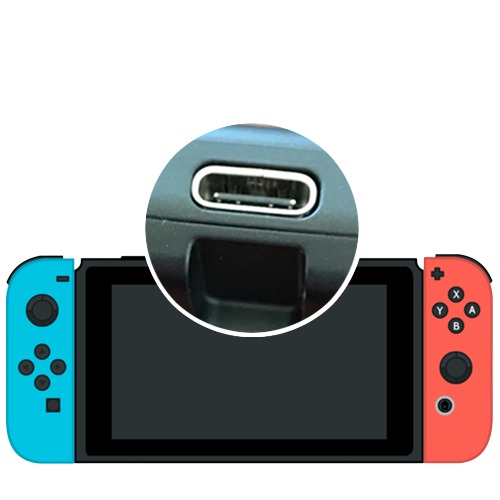
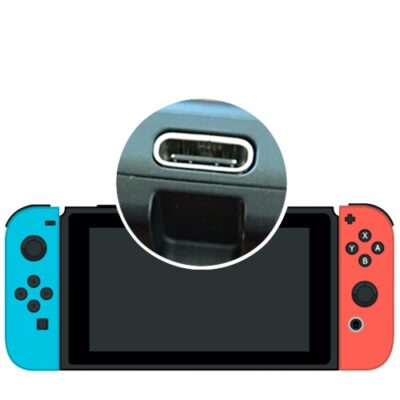
The USB-C charging port is the single most-failed part on the Nintendo Switch. It's soldered directly to the motherboard and takes the stress of every plug, drop, and yank on the cable — so its solder joints crack, its pins bend, and eventually the console stops charging reliably. We replace the port itself with board-level micro-soldering, then test charging and dock connection before it ships back. Every Switch model, 180-day warranty on the work.
Compatible with
What's included
How it works
Place your order
Select your console model and complete checkout. No diagnosis fee — you only pay the listed repair price.
Ship your Switch to us
We recommend UPS with tracking — Pirate Ship is the cheapest way to buy a UPS label. Console only — no dock, cables, or SD card needed. Follow our shipping instructions for packaging tips.
We replace & test
The old port comes off, the new one goes on with clean board-level soldering, and we test charging plus dock connection — along with an internal dust clean and fresh thermal paste.
Receive it back, charging
We ship it back free, usually within 24–48 hours of arrival. Plug it in and you're good to go.
Symptoms of a Failed Charging Port
Charging port failure is usually gradual — it starts as an annoyance and ends with a console that won't power on at all. If any of these sound familiar, the port is the likely cause:
Only charges at certain cable angles. You have to prop the cable a specific way, or hold it, to get the charging icon. This is cracked solder joints on the port — the connection makes and breaks as the port shifts.
Won't charge at all. No charging icon, no response, and the console eventually dies. If a known-good charger and cable change nothing, the port or the charging IC is at fault.
Cable feels loose or falls out. The plug no longer clicks in firmly. The port's internal contacts and retention clips wear out with use, and a loose port damages cables too.
Charges handheld but won't dock. Docking needs more pins working than charging does, so a partially damaged port often charges fine while failing to output video.
Debris in the port, or it got dropped while plugged in. Pocket lint packs into the port and blocks contact; a fall while charging bends the port or tears it from its pads. Both are repairable.
Port area gets warm while charging. Stop using it and get it looked at — heat at the port can mean a damaged port or a failing charging IC, and continuing to charge risks further board damage.
Port Replacement vs. Charging IC Repair
Not every "won't charge" Switch needs a new port. Two different faults produce nearly identical symptoms:
The charging port is the physical USB-C connector. It fails mechanically — cracked solder joints, bent pins, worn contacts, debris, or damage from a drop while plugged in. This is the more common of the two and it's what this service covers.
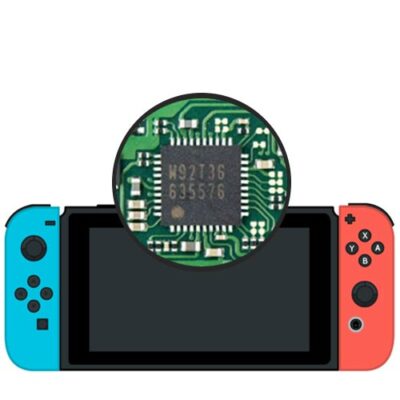
The M92T36 charging IC is the chip that controls power delivery. It fails electrically, usually from a cheap third-party dock or a bad charger pushing voltage outside spec. If your Switch died right after using an off-brand dock, that's the more likely culprit — see our M92T36 IC replacement service.
You don't have to work out which one it is before ordering. We diagnose the actual fault when your console arrives, and if it turns out to need the other repair, we'll contact you with what we found and what it costs before doing anything beyond what you ordered.
Why Charging Ports Have to Be Replaced, Not Repaired
The USB-C port is soldered directly onto the motherboard across a dense set of pads — there's no cable, no connector, nothing to unplug. Replacing it means removing the old port with hot air without lifting the pads underneath, cleaning the footprint, aligning a new port across every pin, and reflowing it without bridging any of them.
That's why most repair shops won't touch it and will quote you a full motherboard replacement or tell you to buy a new console. It needs a microscope, proper hot air, and enough experience to recognize when a pad has been torn and needs rebuilding with a jumper. We've been doing this rework since 2010, and a torn pad isn't the end of the repair for us — it's just part of the job.
Common questions
The price for this service is listed above and covers the new port, the board-level installation, internal cleaning, fresh thermal paste, testing, and free return shipping. There's no separate diagnosis fee. If we find the fault is something else, such as the charging IC, we contact you with the cost before doing any additional work.
Almost certainly. That symptom is caused by cracked solder joints on the port — the connection makes and breaks as the cable moves. It gets worse over time and eventually stops charging entirely, so it's worth fixing before the console dies completely.
If the port is the cause, yes. A dead-charging Switch can also be a failed M92T36 charging IC or, less often, a battery issue. We diagnose the actual fault when it arrives and tell you what we find before doing work beyond what you ordered.
Yes. This service covers every current Nintendo Switch model — V1, V2, Lite, and OLED. The port and board layout differ between models and we use the correct part for yours.
Sometimes — packed-in lint can block contact and a careful cleaning fixes it. Try that first with a plastic tool and no liquid. If cleaning doesn't restore charging, the port itself has failed and cleaning won't bring it back.
No. This is a hardware repair on the motherboard — your system storage, saves, and accounts are untouched. You don't need to send your SD card, and we never access your software or accounts.
Repairs are usually completed within 24–48 hours of arrival, then shipped back free. Local customers can call to book a same-day appointment.
Yes. Every charging port replacement carries our 180-day warranty. If there's any issue with our work, contact us and we'll make it right.
Reviews
There are no reviews yet.